
FixVegas1.1 - App Store
You'll be able to see results in few seconds.
Publisher Description
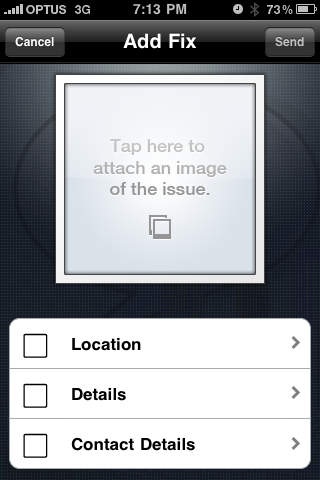
Have you noticed something in need of fixing around Brisbane? From blocked drains to damaged street signs, rubbish or graffiti, FixVegas allows you to send fix-o-gram requests directly to Brisbane City Council. Just use FixVegas to snap a shot of the problem and your fix-o-gram is submitted to Council along with the location information of the issue that you are reporting.
Brisbane residents can save time and get more involved with their city since FixVegas effortlessly captures the problem on the spot without having to phone or write to the Council.
FixVegas submits maintenance requests electronically to Brisbane City Council via their website www.brisbane.qld.gov.au. FixVegas is proudly brought to you by QUT Urban Informatics Research Group. We make no representations as to the reliability of the submission of maintenance requests to Council. Brisbane City Council promises to fix or inspect issues within 30 days.
Issues that can be reported this way include:
rubbish - lots of litter in a park or on the roadside
graffiti - graffiti on Council buildings or park facilities
park maintenance:
broken furniture or play equipment in a park
damaged signs in a park
overgrown grass in a park
leaking tap in a park
road or footpath maintenance:
damaged footpath, kerbs or gutter
pothole
overgrown grass on the roadside
damaged street signs
stormwater drain maintenance - blocked stormwater grates
App development by Boosted Human. Graphic design by Sanji of Wonderland Design Melbourne. Photo used in the screenshots by Flickr user Nyltiac used under a Creative Commons license.
Requires iOS 3.0 or later. Compatible with iPhone, iPad 2 Wi-Fi, iPad 2 Wi-Fi + 3G, iPad Wi-Fi (3rd generation), iPad Wi-Fi + Cellular (3rd generation), iPad Wi-Fi (4th generation), iPad Wi-Fi + Cellular (4th generation), iPad mini Wi-Fi, iPad mini Wi-Fi + Cellular, iPad Air, iPad Air Wi-Fi + Cellular, iPad mini 2, iPad mini 2 Wi-Fi + Cellular, iPad Air 2, iPad Air 2 Wi-Fi + Cellular, iPad mini 3, iPad mini 3 Wi-Fi + Cellular, iPad mini 4, iPad mini 4 Wi-Fi + Cellular, 12.9-inch iPad Pro, 12.9-inch iPad Pro Wi-Fi + Cellular, 9.7-inch iPad Pro, 9.7-inch iPad Pro Wi-Fi + Cellular, iPod touch (4th generation), iPod touch (5th generation), and iPod touch (6th generation).
About FixVegas
The company that develops FixVegas is Queensland University of Technology. The latest version released by its developer is 1.1.
To install FixVegas on your iOS device, just click the green Continue To App button above to start the installation process. The app is listed on our website since 2010-05-22 and was downloaded 0 times. We have already checked if the download link is safe, however for your own protection we recommend that you scan the downloaded app with your antivirus. Your antivirus may detect the FixVegas as malware if the download link is broken.
How to install FixVegas on your iOS device:
- Click on the Continue To App button on our website. This will redirect you to the App Store.
- Once the FixVegas is shown in the iTunes listing of your iOS device, you can start its download and installation. Tap on the GET button to the right of the app to start downloading it.
- If you are not logged-in the iOS appstore app, you'll be prompted for your your Apple ID and/or password.
- After FixVegas is downloaded, you'll see an INSTALL button to the right. Tap on it to start the actual installation of the iOS app.
- Once installation is finished you can tap on the OPEN button to start it. Its icon will also be added to your device home screen.
Program Details
System requirements
Download information
Pricing
Version History
version 1.1
posted on 2010-05-22
Disclaimer
Official App Store Link
We do not host FixVegas on our servers. We did not scan it for viruses, adware, spyware or other type of malware. This app is hosted by Apple and passed their terms and conditions to be listed there. We recommend caution when installing it.
The App Store link for FixVegas is provided to you by apps112.com without any warranties, representations or guarantees of any kind, so access it at your own risk.
If you have questions regarding this particular app contact the publisher directly. For questions about the functionalities of apps112.com contact us.
